When multiple data sources publish the same Signal K paths (e.g. two GPS devices both providing navigation.position), Signal K Server needs to decide which source to use. The Source Priority system organises sources into Priority Groups and lets you set a ranking per group, with optional per-path overrides.
These features are available in the Admin UI under Data -> Source Priority.
A Priority Group is a set of sources that share at least one published path. Groups are derived automatically: whenever two sources publish the same path, they land in the same group. Chains extend transitively — if A and B share a path and B and C share another, A, B and C are all in the same group.
Typical groups you will see on a real boat:
navigation.position, navigation.courseOverGroundTrue, navigation.speedOverGround, etc.For each group you set a source ranking by dragging the sources into order. The top source is preferred across every shared path in the group, the second source is the first backup, and so on. In most installations, ranking groups is all you need — per-path tweaks are the exception, not the rule.
The sidebar shows a yellow warning badge on the Data menu item while any group lacks a saved ranking. The number reflects how many groups are still unranked; it drops to zero once every group has an order saved.
Within a group, the top-ranked source is preferred — while it is publishing data, its values always win on every shared path. Every other rank has a Fallback after value: the number of milliseconds the currently-winning source must be silent before that rank is allowed to take over.
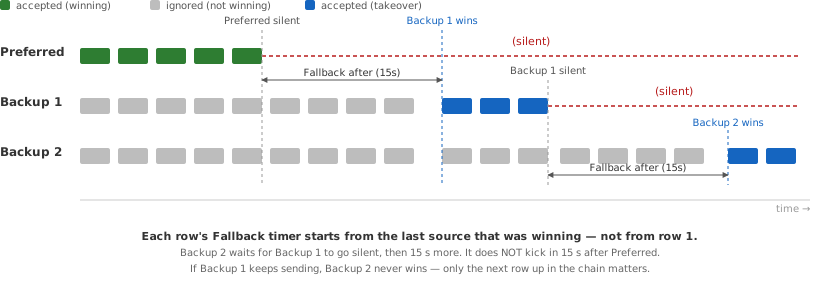
The important subtlety: each rank's timer is measured against whichever source is currently winning, not against rank 1.
The preferred source has no Fallback value because nothing ranks higher. When it returns after any silence, it immediately resumes winning — the backups do not "hold" their position.
Three GPS devices on the boat all publish navigation.position and related paths. Signal K places them in one group. In the Admin UI the sources appear with human-readable labels; the underlying $source values are CAN Names:
| Rank | Shown as | $source (CAN Name) |
Fallback after |
|---|---|---|---|
| 1 | Furuno (can0.c0788c00e7e04312) |
can0.c0788c00e7e04312 |
preferred |
| 2 | Garmin (can0.c0328400e7e00a86) |
can0.c0328400e7e00a86 |
15000 (15 s) |
| 3 | serial0.GP | serial0.GP |
30000 (30 s) |
Scenarios:
A path-level override tells Signal K to use a different ranking for one specific path than the group's ranking would imply. Overrides sit inside the group card — they are the exception, not the rule.
A common example: two GPS units land in one group, Furuno is ranked first overall, but the Garmin has a better magnetic-variation (WMM) model. An override on navigation.magneticVariation prefers Garmin on that one path while every other shared path still prefers Furuno.
Inside an override, unchecking Enabled on a row blocks that source on this path entirely, no matter how silent the others become. The disabled row stays visible in the list so it can be re-enabled later without re-ordering.
If a path only has a single publisher today, no group is created for it. You can still add an ungrouped override for that path — useful for pre-configuring ranking before a second source arrives, or for disabling a plugin-only path.
Data from a source that is not listed in the priority table for a path is held back until every listed source has been silent for a safety window. This is so an unconfigured new device on the bus doesn't suddenly hijack a path you have not thought about. The window's default is set conservatively; you can tune it via the Admin UI's Default Fallback after control.
notifications.* paths bypass source priority entirely — every source's notifications are delivered unchanged. Notifications are events, not measurements, so suppressing one source's alarm because another source is "preferred" is never the right behaviour.
Raw NMEA 0183 sentences forwarded to the NMEA 0183 TCP server on port 10110 are not filtered either. See NMEA 0183 Output.
All source data is preserved in the server's data model regardless of priority configuration. Priority only affects which source's values are delivered to subscribers by default. See Source Priority in the Data Browser for how to view every source's data.
Sentences received on NMEA 0183 connections are forwarded as raw NMEA 0183 to the NMEA 0183 TCP server on port 10110, independently of their conversion to Signal K. Source priority works on the converted Signal K data, so it never applies to this pass-through: with two GPS receivers connected, a client on port 10110 receives the sentences of both.
Therefore outputs that take source priorities into account need to be built from the Signal K data rather than passed through. The signalk-to-nmea0183 plugin generates its sentences from the priority-filtered values, so its output follows the preferred source and the fallback behaviour described in How Rankings Work. For that output to be the only copy of the data on port 10110, the pass-through of the original sentences is switched off on the connections that carry them, see NMEA 0183 Options.
The Data Browser (Data -> Browser) has a Sources dropdown that controls which source's data is displayed:
Use All sources to:
The View dropdown lets you switch between a flat path listing (Paths) and a source-grouped view (By Source) that shows the same full table grouped under source headers.
Signal K Server identifies sources differently depending on the connection type:
N2K sources are identified by their CAN Name — a globally unique 64-bit identifier derived from the ISO Address Claim (PGN 60928). Each device on the bus has a unique NAME even if the manufacturer and model are identical (the NAME includes a per-device unique number). This is more reliable than the source address (which can change when devices are added or removed from the bus).
The $source field contains the hex-encoded CAN Name (for example can0.c0788c00e7e04312) once the device's Address Claim has been received. Until that point the server may use the source address as a placeholder.
The Admin UI shows a human-readable label derived from the manufacturer and model (PGN 60928 + 126996), e.g. Furuno (can0.c0788c00e7e04312). You can set a custom alias via the pencil icon next to any source label. Two identical devices (same manufacturer and model) have different CAN Names, so aliases help distinguish them — e.g. "Bow GPS" and "Stern GPS".
See NMEA 2000 Device Management for details.
NMEA 0183 sources are identified by the connection name and talker ID, e.g. serial0.GP.
Plugin sources use the plugin ID as their $source, e.g. derived-data or signalk-venus-plugin.
