The Notifications API enables the raising, actioning and centralised management of Signal K notifications and their associated alarms.
Notifications are a special type Signal K update delta that convey the occurrence of an event or change in condition.
They contain a path value that starts with the text notifications and a payload with specific attributes to indicate:
state)method)status)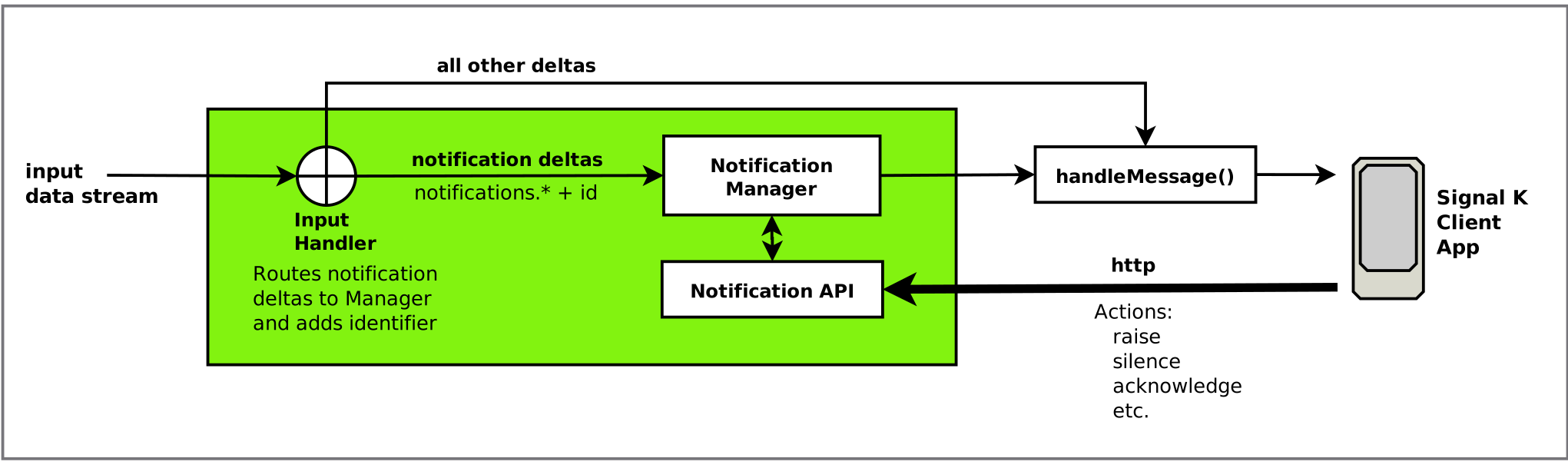
The Notifications API introduces the following components into the Signal K server's delta processing chain:
notifications) to the Notification Manager.The Signal K specification uses the terms
notificationandalarminterchangably, whilst Signal K Server assigns notification deltas originating from NMEA2000 alarm PGNs with attributes with the termalert.
For consistency and clarity this document will use the the following terminology:
notification - A Signal K update delta message with a path starting with the text notifications.alarm - The communication of the event / condition to the operator.The Notifications API implements a Notification Manager that provides the ability to action alarms and lifecycle management.
It does this by:
update in the delta messagestatus property to the payload/signalk/v2/api/notifications to perform actionsNote: Actions are only available for notifications containing a payload containing
stateandmethodproperties.
The Notification API adds the following attributes to the notification payload:
id - Unique identifier that is used when taking action on a notificationstatus - An object detailing the actions that can be and have been takenThe following attributes can be applied when a notification is raised using the API:
createdAt - Timestamp indicating when the notification was raisedposition - Position associated with the notification (i.e. vessel position when notification was raised)data - Additional data associated with the notification in key | value pairsExample
{
"state": "emergency",
"method": ["sound", "visual"],
"message": "Person Overboard!",
"id": "a987be59-d26f-46db-afeb-83987b837a8f",
"status": {
"silenced": false,
"acknowledged": false,
"canSilence": false,
"canAcknowledge": true,
"canClear": true
},
"createdAt": "2026-04-06T03:34:48.203Z",
"position": {
"latitude": 57.73241514375983,
"longitude": 11.66365146637231
},
"data": {
"crewId": "c67345"
}
}
The status attribute is added to all notifications that have a payload containing state and method attributes.
The following status properties indicate the actions that CAN be taken. Their values are determined by the notification's state attribute:
canSilence - indicates whether the Alarm associated with this notification can be silencedcanAcknowledge - indicates whether the Alarm associated with this notification can be acknowledgedcanClear - Indicates that the associated Alarm can be cleared (triggering condition has been resolved).Note:
canClearwill always befalsefor notifications that are not originated by the Notifications API.
The remaining properties indicate the actions that HAVE been taken:
silenced - true when the silence action has been takenacknowledged - true when the acknowledge action has been takenacknowledgedAt - timestamp indicating when the acknowledge action was takenThe Notification API implements endpoints to raise, update, take action, and clear notifications and their associated alarm at /signalk/v2/api/notifications/.
To raise a new notification with a specified alarm state send a HTTP POST request to /signalk/v2/api/notifications with an object containing the following properties:
state (mandatory) - alarm state value to set (e.g. emergency, alarm, etc.)message (mandatory) - message to display or speakcontext (optional) - notification contextpath (optional) - path to assign. (default: notifications.{notificationId})idInPath (optional) - when true will append the notificationId to the supplied path (e.g. notifications.myalarm.{notificationId})includePosition (optional) - when true includes the vessel position in the notification payloadincludeCreatedAt (optional) - when true includes the current date/time in the notification payloaddata (optional) - object containing additional key / value pairs to include in the notification payloadThe response from a successful raise request will contain the notificationId of the notification.
{
"state": "COMPLETED",
"statusCode": 200,
"id": "a987be59-d26f-46db-afeb-83987b837a8f"
}
Example: Minimal raise request
HTTP POST "/signalk/v2/api/notifications"
{
"state": "alarm"
"message": "Port engine temperature is very high!"
}
Notification
{
"path": "notifications.a987be59-d26f-46db-afeb-83987b837a8f",
"value": {
"message": "Port engine temperature is very high!",
"method": ["sound", "visual"],
"state": "alarm",
"id": "a987be59-d26f-46db-afeb-83987b837a8f",
"status": {
"silenced": false,
"acknowledged": false,
"canSilence": true,
"canAcknowledge": true,
"canClear": true
}
}
}
Example: raise request specifying path
HTTP POST "/signalk/v2/api/notifications"
{
"state": "alarm"
"message": "Port engine temperature is very high!",
"path": "propulsion.port.temperature"
}
Notification
{
"path": "notifications.propulsion.port.temperature",
"value": {
"message": "Port engine temperature is very high!",
"method": ["sound", "visual"],
"state": "alarm",
"id": "a987be59-d26f-46db-afeb-83987b837a8f",
"status": {
"silenced": false,
"acknowledged": false,
"canSilence": true,
"canAcknowledge": true,
"canClear": true
}
}
}
To raise a MOB alarm send a HTTP POST request to /signalk/v2/api/notifications/mob.
HTTP POST "/signalk/v2/api/notifications/mob"
MOB Notification
{
"path": "notifications.mob.a987be59-d26f-46db-afeb-83987b837a8f",
"value": {
"message": "Person Overboard!",
"method": ["sound", "visual"],
"state": "emergency",
"id": "a987be59-d26f-46db-afeb-83987b837a8f",
"status": {
"silenced": false,
"acknowledged": false,
"canSilence": false,
"canAcknowledge": true,
"canClear": true
},
"createdAt": "2026-04-06T03:34:48.203Z",
"position": {
"latitude": 57.73241514375983,
"longitude": 11.66365146637231
}
}
}
To include a specific message, provide a message with the request.
HTTP POST "/signalk/v2/api/notifications/mob" {
"message": "Crew member #1 overboard!"
}
MOB Notification
{
"path": "notifications.mob.a987be59-d26f-46db-afeb-83987b837a8f",
"value": {
"message": "Crew member #1 overboard!",
"method": ["sound", "visual"],
"state": "emergency",
"id": "a987be59-d26f-46db-afeb-83987b837a8f",
"status": {
"silenced": false,
"acknowledged": false,
"canSilence": false,
"canAcknowledge": true,
"canClear": true
},
"createdAt": "2026-04-06T03:34:48.203Z",
"position": {
"latitude": 57.73241514375983,
"longitude": 11.66365146637231
}
}
}
To change the alarm state or message send a HTTP PUT request to /signalk/v2/api/notifications/{notificationId} with an object containing state, message and / or data properties.
The result of a successful update request that changes the state is that:
state is set to the supplied valuestatus.silenced is set to falsestatus.acknowledged is set to falseExample: Notification payload prior to update action request.
{
"message": "Engine temperature is above normal range!",
"method": ["visual"],
"state": "warn",
"id": "a987be59-d26f-46db-afeb-83987b837a8f",
"status": {
"silenced": true,
"acknowledged": false,
"canSilence": true,
"canAcknowledge": true,
"canClear": true
}
}
Update action request
HTTP PUT "/signalk/v2/api/notifications/a987be59-d26f-46db-afeb-83987b837a8f" {
"message": "Engine temperature is very high!",
"state": "alarm"
}
Notification: after successful update request
{
"message": "Engine temperature is very high!",
"method": ["sound", "visual"],
"state": "alarm",
"id": "a987be59-d26f-46db-afeb-83987b837a8f",
"status": {
"silenced": false,
"acknowledged": false,
"canSilence": true,
"canAcknowledge": true,
"canClear": true
}
}
Note: The clear action is only available for alarms associated with notifications having
status.canClear = true.
To clear the alarm send a HTTP DELETE request to /signalk/v2/api/notifications/{notificationId}.
The result of a successful clear request is that the:
state value is set to normalstatus.silenced is set to falsestatus.acknowledged is set to falsestatus.acknowledgedAt is not presentIf the clear action is requested when the status.canClear property is false, the alarm will not be cleared and an ERROR response is returned to the requestor.
Example: Notification payload prior to clear action request.
{
"message": "Engine temperature is high!",
"method": ["visual"],
"state": "alert",
"id": "a987be59-d26f-46db-afeb-83987b837a8f",
"status": {
"silenced": true,
"acknowledged": false,
"canSilence": true,
"canAcknowledge": true,
"canClear": true
}
}
Clear action request
HTTP DELETE "/signalk/v2/api/notifications/a987be59-d26f-46db-afeb-83987b837a8f"
Notification: after successful clear request
{
"message": "Engine temperature is high!",
"method": ["visual"],
"state": "normal",
"id": "a987be59-d26f-46db-afeb-83987b837a8f",
"status": {
"silenced": false,
"acknowledged": false,
"canSilence": true,
"canAcknowledge": true,
"canClear": true
}
}
Note: The silence action is only available for alarms associated with notifications having
status.canSilence = true.
To silence the alarm send a HTTP POST request to /signalk/v2/api/notifications/{notificationId}/silence.
The result of a successful silence request is that the:
sound value is removed from the method attributestatus.silenced is set to trueIf the silence action is requested when the status.canSilence property is false, the alarm will not be silenced and an ERROR response is returned to the requestor.
Note: Notifications with
state = emergencycannot be silenced regardless of the value ofstatus.canSilence.
Example: Notification payload prior to silence action request.
{
"message": "Engine temperature is high!",
"method": ["sound", "visual"],
"state": "alert",
"id": "a987be59-d26f-46db-afeb-83987b837a8f",
"status": {
"silenced": false,
"acknowledged": false,
"canSilence": true,
"canAcknowledge": true,
"canClear": true
}
}
Silence action request
HTTP POST "/signalk/v2/api/notifications/a987be59-d26f-46db-afeb-83987b837a8f/silence"
Notification: after successful silence request
{
"message": "Engine temperature is high!",
"method": ["visual"],
"state": "alert",
"id": "a987be59-d26f-46db-afeb-83987b837a8f",
"status": {
"silenced": true,
"acknowledged": false,
"canSilence": true,
"canAcknow;edge": true,
"canClear": true
}
}
Note: The acknowledge action is only available for alarms associated with notifications having
status.canAcknowledge=true.
To acknowledge the alarm send a HTTP POST request to /signalk/v2/api/notifications/{notificationId}/acknowledge.
The result of a successful acknowledge request is that the:
sound & visual values are removed from the method attributestatus.acknowledged is set to truestatus.acknowledgedAt holds the timestamp of when the alarm was acknowledged.If the acknowledge action is requested when the status.canAcknowledge property is false, the alarm will not be acknowledged and an ERROR response is returned to the requestor.
Note: Notifications with
state = emergencywill only have thesoundvalue removed frommethod.
Example: Notification prior to acknowledge request.
{
"message": "Engine temperature is high!",
"method": ["sound", "visual"],
"state": "alert",
"id": "a987be59-d26f-46db-afeb-83987b837a8f",
"status": {
"silenced": true,
"acknowledged": false,
"canSilence": true,
"canAcknow;edge": true,
"canClear": true
}
}
Acknowledge action request
HTTP POST "/signalk/v2/api/notifications/a987be59-d26f-46db-afeb-83987b837a8f/acknowledge"
Notification: after successful acknowledge request
{
"message": "Engine temperature is high!",
"method": [],
"state": "alert",
"id": "a987be59-d26f-46db-afeb-83987b837a8f",
"status": {
"silenced": true,
"acknowledged": true,
"acknowledgedAt": "2026-04-06T03:34:48.203Z",
"canSilence": true,
"canAcknow;edge": true,
"canClear": true
}
}
NMEA2000 alarm PGNs are processed by n2k-signalk which generates Signal K notification deltas as follows:
notifications.nmea.*state, method and message attributesThe Notification API uses these additional PGN attributes to populate the notification status to align the available actions and any action taken.
Example: Signal K notification from NMEA2000 Alarm PGN
{
"path": "notifications.nmea.alarm.navigational.20.8196" //
"value": {
"state": "alarm",
"method": [
"visual",
"sound"
],
"message": "Highwater",
"alertType": "Alarm",
"alertCategory": "Navigational",
"alertSystem": 20,
"alertId": 8196,
"dataSourceNetworkIDNAME": 1240095849160158000,
"dataSourceInstance": 215,
"dataSourceIndex-Source": 1,
"occurrence": 2,
"temporarySilenceStatus": "No",
"acknowledgeStatus": "No",
"escalationStatus": "No",
"temporarySilenceSupport": "No",
"acknowledgeSupport": "Yes",
"escalationSupport": "No",
"acknowledgeSourceNetworkIDNAME": 1233993293343261200,
"triggerCondition": "Auto",
"thresholdStatus": "Threshold Exceeded",
"alertPriority": 0,
"alertState": "Active"
}
}
state MappingNMEA2000 alarm states are mapped to Signal K notification state as follows:
| NMEA2000 State | Signal K State | Description |
|---|---|---|
| Emergency Alarm | emergency |
A life-threatening condition |
| Alarm | alarm |
Immediate action is required to prevent loss of life or equipment damage |
| Warning | warn |
Indicates a condition that requires immediate attention but not immediate action |
| Caution | alert |
Indicates a safe or normal condition which is brought to the operators attention to impart information for routine action purposes |
| -- | normal |
Indicates normal operation. |
| -- | nominal |
This is can be used to indicate value has entered a range within the normal zone |
Reference: Signal K Specification
method MappingThe n2k-signalk plugin will set a notification's method = [] when the NMEA2000 acknowledgeStatus OR temporarySilenceStatus attributes are set to "Yes".
The Notifications API will re-write the method attribute value, as outlined above in Silencing a Notification and Acknowledging a Notification, to ensure alignment across all notifications regardless of source.
The Notification
methodproperty is managed by the API and the value assigned is based on the value of thestateandstatusproperties.
The tables below detail the resultant notification method following the successful completion of an operation.
Generates notifications with the following property values:
| Source | State | Method | canSilence | canAcknowledge | canClear |
|---|---|---|---|---|---|
| API | emergency |
[visual,sound] |
false | true | true |
| Delta | emergency |
from delta | from delta temporarySilenceSupport | from delta acknowledgeSupport | false |
| API | all others | [visual,sound] |
true | true | true |
| Delta | all others | from delta | from delta temporarySilenceSupport | from delta acknowledgeSupport | false |
Note: All incoming notifications to the Signal K Server, that were not generated by the Notification API, will have
canClear = false.
Updates notification method property:
| Source | Condition | Method |
|---|---|---|
| API | canSilence = true |
[visual] |
Updates notification method property as follows:
| Source | State | Condition | Method |
|---|---|---|---|
| API | emergency |
canAcknowledge = true |
[visual] |
| API | all others | canAcknowledge = true |
[] |
Updates notification state & status properties as follows:
| Source | Condition | State | silenced | acknowledged |
|---|---|---|---|---|
| API | canClear = true |
normal |
false | false |
By default the server manages the lifecycle of all notifications as described
above. Setting notifications.manageNotifications to false in the server
settings (Server -> Settings in the admin UI, restart required) takes the core
notification manager out of the notification path so an external handler can
own the lifecycle instead. notifications.* deltas then flow to the data
model unmodified — no server-assigned id or status is embedded in values.
With management disabled the API surface stays mounted but behaves as follows:
| Operation | Behavior when disabled |
|---|---|
GET /notifications |
Served from the data model (self context only). Keys are the source-supplied value.id when present, otherwise the notification path. No status enrichment. |
POST /notifications (raise), POST /notifications/mob |
Emit the notification delta directly. path is required for raise (no notifications.{id} fallback) and context is ignored. The returned id is embedded in the emitted value but not tracked by the server. |
GET/PUT/DELETE /notifications/{id}, {id}/silence, {id}/acknowledge, silenceAll, acknowledgeAll |
Respond 501 with {"state": "FAILED", "statusCode": 501, "message": ...}. The matching app.notifications.* plugin methods throw NotificationManagerDisabledError (identify via instanceof or error.code === 'NOTIFICATION_MANAGER_DISABLED'). |
